
Okay so first of all, let's check if there's any FAQ about Commands a deviant can use on dAmn!

FAQ #292: What are the commands that I can use on the chat network?
Have you ever wondered how other deviants in chatrooms do that their message is in italics and not looking like a normal text?
It's really easy!
All you have to typing in is the following:
This will happen!
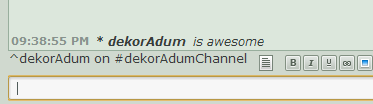
How to do an action?
Have you ever wondered how other deviants in chatrooms do that their message is in italics and not looking like a normal text?
It's really easy!
All you have to typing in is the following:
/me is awesomeThis will happen!

How can I find my friend?

If you are looking for a friend of yours or you're a ninja on a special mission, you can find them!

All you have to do is typing in the following:
/whois dekoradumYou'll see the following
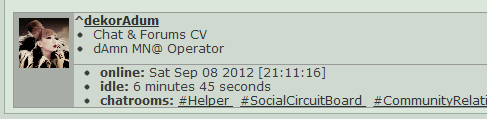
Please note that it only works if your friend (or the deviant you are looking for or interested in what kind of rooms they are in) is online!
You'll receive an error message if that's not the case
Leaving a room
without closing all the other tabs
It's simple. If you would like to leave a room but you are still chatting in other rooms and you'd rather not close the browser window and rejoin every room just to get rid of one, you can do the following!
Simply type in the following:
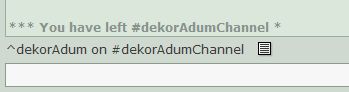
This is a really nice and useful command
Simply type in the following:
/part channelnameThis is a really nice and useful command
Checking privclasses
If you'd like to know who is in a certain privclass of the channel you are in, type in the following:
/admin show users Note: if you type in this, it will show every privclass and their Members

But if you'd like to know the Mods only,
/admin show users ModeratorsNote: The privclass name can be different in other channels
This command is helpful if you would like to contact the Moderators, Founders for any reason and you can't find out who they are, now you'll know how to find it out! (in unofficial channels!)
This command is helpful if you would like to contact the Moderators, Founders for any reason and you can't find out who they are, now you'll know how to find it out! (in unofficial channels!)
This command was suggested by Astralseed 

Still need help? Then it's best to visit :#help: on dAmn
Chat Tutorials
- How to Create a Chatroom?
- What Privclasses are?
- Customizing your Chatroom
- Deleting Chatrooms
- Joining Chatrooms
- Tabbing - What is it and How?
- Requesting HELP
Forum Tutorials
Suggestions
You have ideas? Awesome! Then please leave a comment on this journal!
Cheers,
BitterBeanJuicer